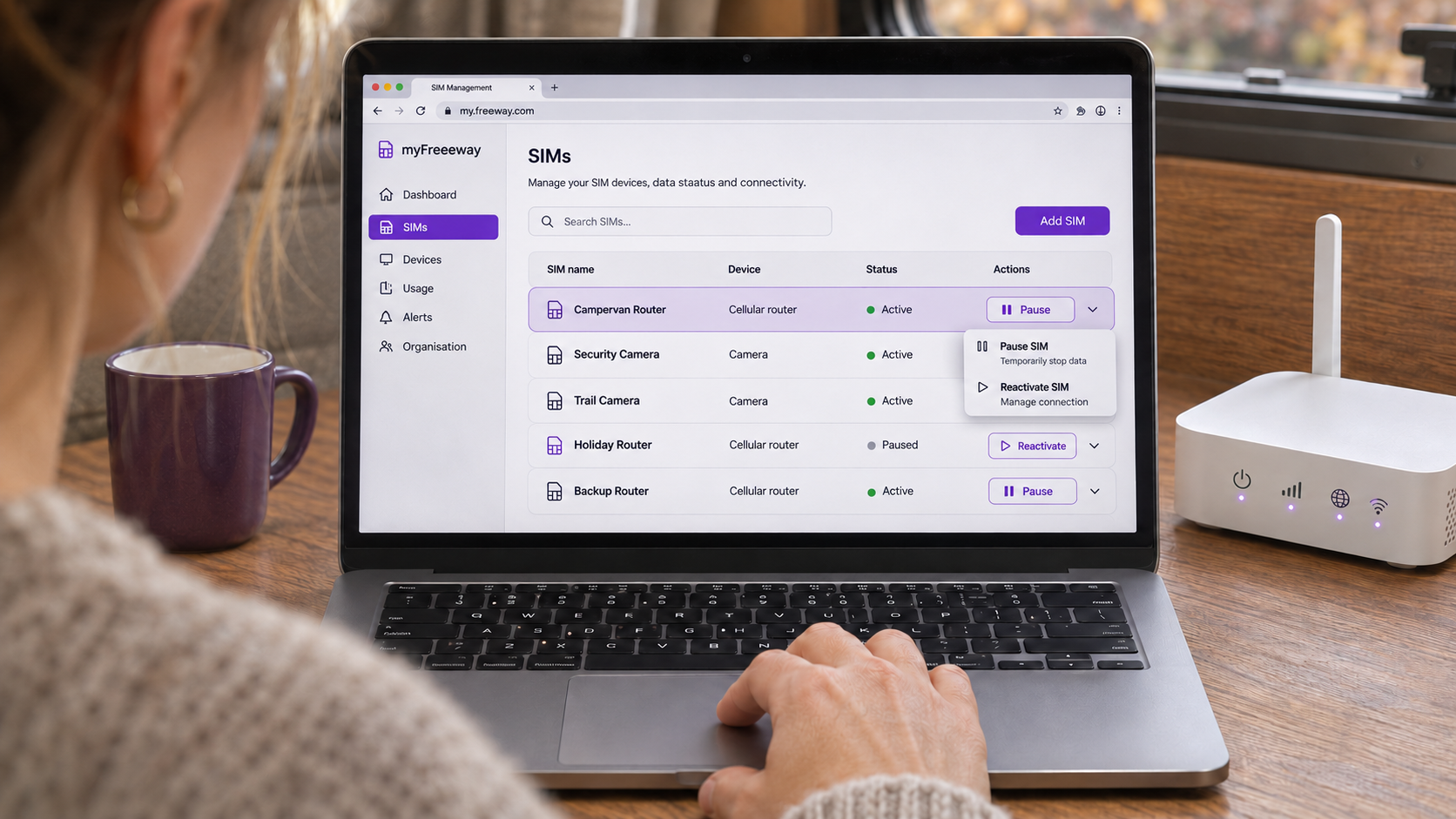
Connected devices may have a busy season and a quiet one. A campervan router could be in daily use throughout August, then sit in the garage for months. With myFreeeway, it’s possible to pause and reactivate its IoT SIM through the web app as plans change. If your device needs more or less data, you can also review the available plans, checking when a change would take effect and how it affects your subscription and billing. A little planning helps you keep connectivity suited to your routine, whether you’re packing equipment away for winter or preparing for your next trip.
Pausing can be useful for equipment you’re putting away between trips or seasons. You can manage this through the myFreeeway web app.
While the SIM is paused, the device cannot send or receive data through that mobile connection. Consider which functions depend on it before making the change. A camera may continue recording locally if it supports that feature, but uploading footage and sending remote alerts require a working connection. For a campervan parked over winter, think about whether its router also connects an alarm or security camera you still want to access.
When you’re ready to use the device again, you can reactivate the SIM through the web app. Give yourself time to check the connection before leaving for a trip or reinstalling equipment somewhere difficult to reach. Once the SIM and its data service are active, power on the device and test an everyday task, such as opening a webpage through the router or receiving a new camera image.
If it fails to connect, check the power supply, mobile signal and device settings. Roaming should be enabled, and the APN - the setting used to establish the mobile data connection, must be configured correctly.
A longer holiday, more frequent camera uploads or another device joining your setup can increase your data needs. A quieter period may be a good time to review whether your existing allowance still fits. Start with your recent usage and what you expect over the coming month. Our guide, “How to choose an IoT data plan for your device,” can help you estimate a suitable allowance.
Before requesting a plan change, check:
If these details aren’t clear in your account, myFreeeway support can help you confirm the options before you make a change.
Pausing a SIM stops its mobile connectivity, but it doesn’t change your billing. What you continue to pay depends on your subscription’s billing and cancellation conditions. myFreeeway offers monthly cancellation. Before deciding whether to pause a SIM or cancel a subscription, check the relevant dates, any ongoing charges and what you’ll need to do when you want to reconnect.
This is particularly useful for longer breaks, when you already know the device will be stored for several months.
If several SIMs share one data allowance, include the devices that will remain active when reviewing your subscription. Putting a holiday router away may reduce overall usage, while a security camera still needs data every day. Check which SIM you’re adjusting and whether you’re changing that individual connection or the shared subscription. Keep enough data available for the devices you continue to rely on.
You can manage your SIMs through the myFreeeway web app and explore available data plans when your needs change. For questions about timing or billing, have your current plan and intended change ready when contacting support.


{
"@context": "https://schema.org",
"@type": "BlogPosting",
"mainEntityOfPage": {
"@type": "WebPage",
"@id": "https://myfreeeway.com/blog/how-to-pause-and-reactivate-an-iot-sim-with-myfreeeway"
},
"headline": "How to Pause and Reactivate an IoT SIM with myFreeeway",
"description": "Learn how to pause and reactivate your myFreeeway IoT SIM, review your data plan and check billing conditions when your device use changes.",
"author": {
"@type": "Person",
"name": "Mia Ščap"
},
"publisher": {
"@type": "Organization",
"name": "myFreeeway",
"url": "https://myfreeeway.com"
},
"datePublished": "2026-11-06",
"url": "https://myfreeeway.com/blog/how-to-pause-and-reactivate-an-iot-sim-with-myfreeeway",
"inLanguage": "en",
"articleSection": "IoT SIM Management",
"keywords": [
"Pause IoT SIM",
"Reactivate IoT SIM",
"myFreeeway SIM management",
"IoT SIM activation",
"IoT SIM subscription",
"Flexible IoT data plans",
"IoT SIM billing",
"Seasonal IoT connectivity",
"myFreeeway Web App"
]
}